Faster Account Setup
Every commercial water system is unique, but they often have a thing or two in common. In Aqualytics, you can now use an existing account to bootstrap a new account.
Doing some work at a new dry kiln? Use the one on the other site of your territory as a template.
Writing up an introductory report for a new sales prospect? Save time setting up your reporting system.
Get Going Fast
When you click the “New Account” button, the form includes a dropdown of your other accounts:
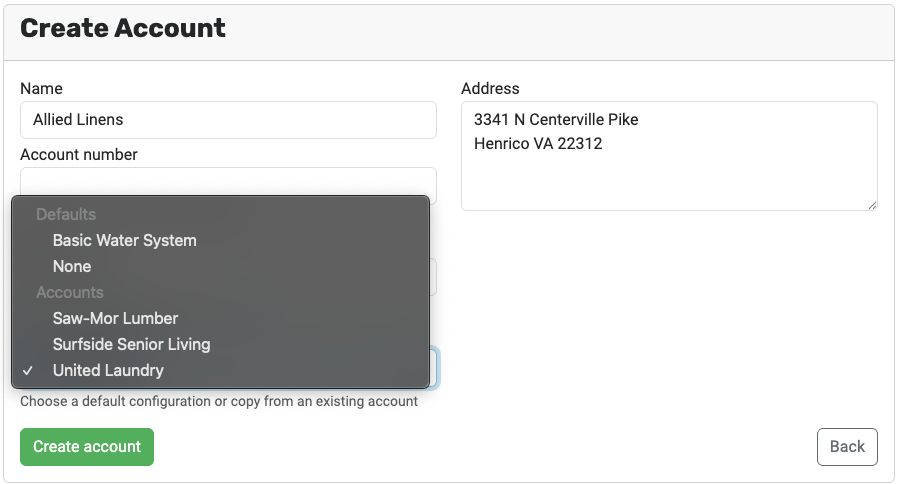
When you select one, Aqualytics will copy several configurations from it into the new account:
- Samples: The new account will have the same water system setup – boilers, cooling towers, closed loops, etc – as the one it copied, including component names and groups.
- Tests: The new account will have the same testing matrix as the one it copied (ie, which tests on which system components).
- Control ranges and target cycles: These data values are copied from report to report, including when setting up a new account
- Default Trends are copied into the new account and into the first report for the new account
- Inventory: chemicals and container sizes are copied into the new account
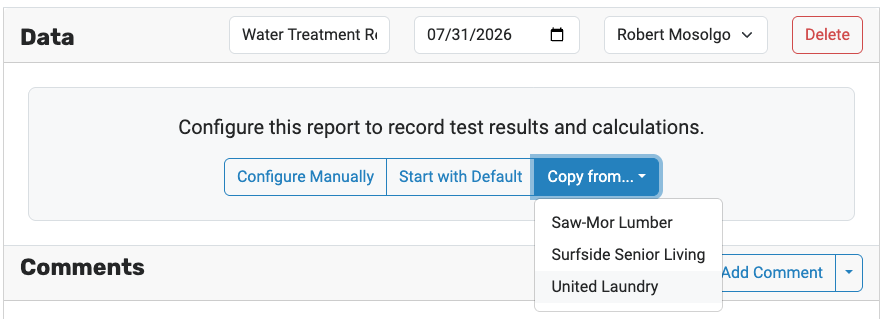
If you don’t choose to copy an existing account while you’re setting up a new account, you can also copy from it when creating your first report:
Give it a Try
Get out there and find a new account! Adding it to Aqualytics has never been easier.

Ready for better service reports?
Get started with the best software for water treatment service reports.